The Storm-Proof Desk: A Cheap, Practical Surge Check for Pembrokeshire Home Tech
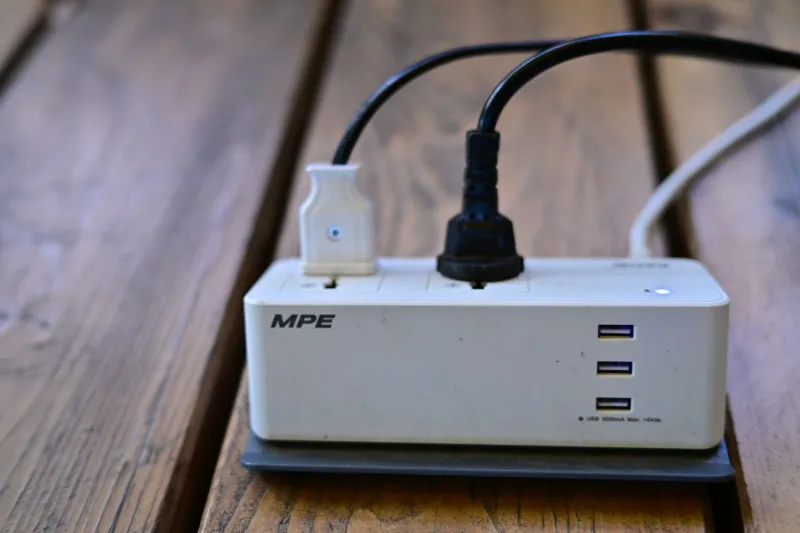
There's a particular noise a house makes when the power goes in a November gale. The fridge stops, the boiler grumbles, and somewhere in the corner the desktop PC gives a little click as it dies mid-sentence. If that's happened to you more than once this autumn, this one's for you.
Most of the machines we see after stormy weather weren't struck by lightning. They were killed by something far more ordinary: the messy, stuttering supply that happens as power drops out and comes back. Out in the villages and along the coast road, where lines run overhead between poles, that stutter can happen half a dozen times in a minute.
What actually damages your kit
A surge is a brief spike in voltage — sometimes hundreds of volts above normal. A brownout is the opposite: the voltage sags, the PC tries to keep going, the power supply strains, and drives can be left half-written. Then there's the flicker: off, on, off, on. That rapid cycling is brutal on power supplies, routers and anything with a spinning drive in it.
Lightning doesn't need a direct hit either. A strike a mile away can push a surge down the phone line, the aerial coax or an ethernet cable running to a shed or garage. That's the bit most people forget — the mains is only one of the doors the electricity can come through.
The twenty-quid check: do this today
Go and look at what your PC, monitor and router are actually plugged into. Be honest with yourself.
- Is it a surge protector or just an extension lead? The two look almost identical. A real one will say "surge protected" on the box or the back, usually with a joule rating somewhere between 1,000 and 3,000J. A plain four-way block from the supermarket is a plastic box with sockets — no protection whatsoever.
- Is the indicator light still on? Most surge strips have a small LED marked "protected" or "surge". If it's gone dark, the protection has done its job and retired. The sockets still work, which is exactly what makes it so easy to keep using a dead one.
- How old is it? The component that does the work degrades with every small spike. Treat five years, or one big event, as the end of the road and replace it.
- Is anything daisy-chained? Strip into strip into strip is a fire risk, not extra protection.
- Is it sitting somewhere sensible? Not under a radiator, not on a carpet where a fan heater will end up next to it, not with the cable stretched tight across a doorway.
If your PC and router are currently fed by a cheap block, swap in a proper surge-protected strip from a name you recognise. Expect to pay fifteen to twenty-five pounds. That's the whole check, and it's the best value insurance in the house.
While you're down there, press the test button on your consumer unit's RCD if you haven't done it in a while. It should trip off and reset cleanly. If it doesn't, that's a job for an electrician — not a DIY afternoon.
When a strip is enough — and when a UPS earns its keep
A surge strip is the right answer for most homes. One desktop, a monitor, a router, a printer that's only on occasionally: all fine.
A UPS (uninterruptible power supply) is a different animal. It's a box with a battery that keeps the mains flowing for a few minutes after the power goes, and it smooths out sags and flickers while it's at it. It makes sense if any of these sound like you:
- You work from home and lose real money every time a document dies.
- You've got a NAS, a home server or a few external drives that don't like being interrupted.
- Your supply flickers often enough that rebooting the router has become a weekly chore.
Two numbers matter when buying one. VA is the headline figure, watts is what actually counts — aim for roughly 1.5 times the total wattage of what you're plugging in, so there's headroom. And if you're running a desktop, look for a pure sine wave model; the cheaper stepped-wave units upset some power supplies. Budget £70–£120 for a sensible one, and remember the battery inside is a consumable — expect to replace it every three to five years.
Don't put a laser printer on a UPS. The heating element will flatten it in seconds.
The things people forget to protect
Sort the mains and half the job's done, but not all of it:
- The phone cable into the router. A surge-protected strip with a phone or coax pass-through costs a few pounds more and covers this. It's worth it.
- Aerial and satellite coax feeding a TV tuner card.
- Ethernet runs to an outbuilding. If a cable leaves the house and goes to a garage or workshop, both ends want protection — and frankly, a wireless bridge is often the safer answer.
- External drives. Bus-powered 2.5-inch drives are especially fragile. Eject them properly and unplug when they're not in use.
Before the lights flicker: the habits that matter
Hardware protection only goes so far. Three habits cover the rest:
- Let your important files sync automatically — phone photos, school letters, work documents. If it's not syncing without you remembering, it isn't backed up.
- Keep one copy on a drive that spends most of its life unplugged. An unplugged drive can't be fried by a surge and can't be encrypted by ransomware.
- Test a restore once in a while. Copying a file back from your backup is the only proof the backup exists.
A storm-day routine worth pinning to the fridge
When a yellow or amber warning goes up, save your work and shut down properly. If it's going to be a rough night, unplug the PC, router and TV at the wall — a surge protector reduces risk, it doesn't eliminate it. During an outage, leave things unplugged, then wait a few minutes after the supply returns and settles before switching back on. Repeated off-on cycling is what does the damage.
Keep a charged power bank and a torch where you can find them, and remember the national power cut number is 105 — it's free and it works from a mobile.
And if a machine has already taken a hit — it won't POST, it smells faintly of hot plastic, or it boots and immediately dies — stop switching it on to "see if it's better now". Every attempt can push the fault further into the board. Bring it in and let someone look at it properly.